Your product in a Saudi studio in seconds
Pick a Saudi scene for your product. Remove its background on your device. Your photo stays private, with no sign-up.
Open in Safari from the ⋯ menu to save and sign in easily.Open in Chrome
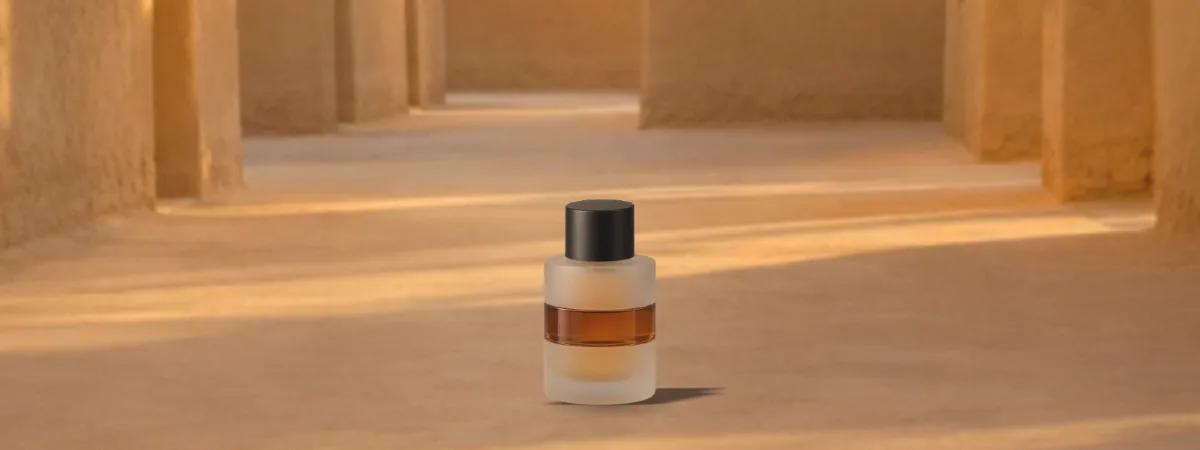
An example made with this tool: our “Perfume” sample in “Diriyah · Golden hour”.
Drag the product with your finger to move it, and use the Size bar to make it bigger or smaller. Drag the product to move it or use the arrow keys, and use the + and − keys for its size.
Or try one of our products
Your photo stays on your device and never reaches a server.
Pick a place
Or a studio set
Adjust the picture
Download and share
Make it a professional AI photo
This is one of our sample products. Upload a photo of your product to make it the star of the picture.
1 free photo when you sign up
One welcome offer per person, subject to daily availability.
For clothing, explore the Studio’s model and wardrobe tools.
To continue with your photo, open this page in Safari or Chrome first, then add the photo there.
Open in ChromeSign up and continue in the Studio
Your product and the place wait in the Studio, in this browser. Sign in with Google or your email.
Your picture is ready
Press and hold the picture, then choose to save it. If nothing appears, open this page in your phone's browser.
In the app's menu (⋯), choose to open in your browser, or copy the link and paste it into Safari or Chrome.
How it works
- Upload a photo of your product from your phone, or pick one of our three products.
- The tool removes the background on your device in a few seconds, or in about a minute on a slower phone.
- Pick a Saudi place: Diriyah, the Jeddah corniche, the old souq, a desert camp and more.
- Drag the product where you want it, make it bigger or smaller, and choose warm or cool light.
- Download the picture square for a post or tall for a story, and share it with anyone.
Your photo stays on your device
The background removal runs inside your browser, on your own device. Your photo is never uploaded to Lenci or stored on a server, and you need no account to use the tool.
The first time you upload a photo, your browser downloads the background remover once, from Lenci or from the network of IMG.LY, which made it. The download's size shows on the upload box before you pick a photo, and you can cancel it. The download carries nothing of your photos, and our sample products do not need it at all.
Eight ready places: six Saudi scenes and two studio sets
The Saudi scenes come from the Lenci catalogue: “Diriyah · Golden hour”, “Jeddah corniche · Sunset”, “Old souq”, “Desert camp”, “Dunes · Dusk” and “Riyadh rooftop · Night”. The studio sets are “Marble gallery” and “White seamless”.
Your product stands on the ground of the place with a natural shadow and light tinted to the place, and it is mirrored on the shiny floors. Choose the square size for posts and store photos, or the tall size for stories.
From this preview to an AI photo
The picture on this page is a quick composition of your product on a ready-made place. In the Studio you continue with the same place and your product photo, then AI turns it into a photoreal photo with natural light, and you can add a model, angles and props.
You make the photo there with Lenci credits. A new account gets free credits when it signs up (one account per email, within a daily limit), and the Studio shows the price of each shot before you shoot.
Tips for a clearer product photo
- Shoot the product in daylight, without flash.
- Let the product fill most of the photo.
- A plain background makes the cutout cleaner.
- Wipe your phone's lens before you shoot.
Frequently asked questions
Do I need an account to use the tool?
No. The tool works without signing up. You need an account only when you move to the Studio to make an AI photo.
Is my photo uploaded to Lenci's servers?
No. The background removal and the composition happen inside your browser. If you move to the Studio, the photo stays in your browser until you sign in and press “Shoot”.
How long is the first download?
It is about 56 MB and downloads once, with the first photo you upload. On a fast connection that usually takes less than a minute, on a slow one longer, and you can cancel it. After that your browser usually keeps it, and the background goes in a few seconds, or in about a minute on a slower phone.
Is the picture right for my store and social media?
Yes. The square picture at 1080 × 1080 suits product photos and posts, and the tall one at 1080 × 1920 suits stories on Snapchat, Instagram and WhatsApp.
Why is the Lenci mark on the picture?
Because the tool is free and runs on your device, it puts a small Lenci mark and the page's address at the bottom of every picture you download from it.
Does the tool work on a phone?
Yes, it is made for phones first, and it works in current browsers on phones and computers. If the page opened inside Instagram, TikTok or Snapchat, open it in your phone's browser to save the picture and sign in. On older devices the background removal can take longer.